WebGL demo for Pixel Art Monster - Dungeon


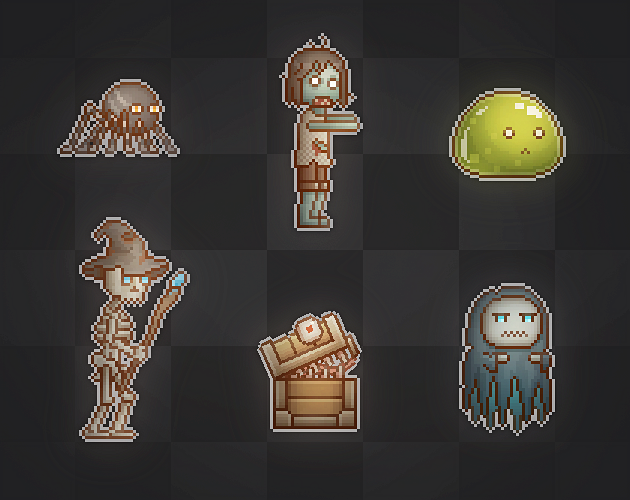
A set of 10 animated dungeon monsters with skin variations for platformer games.


Asset Store


Features

  • Animation Included with Animator properly set up.
  • Fully commented controller scripts.
  • Easy drag and drop usage.


Monsters

  • Slime (Green, Ice, Magma)
  • Zombie (X4)
  • Skeleton (Warrior, Mage, Archer)
  • Mimic (Wooden, Icon, Silver, Golden)
  • Bat (Purple, Brown. Black)
  • Spider (X3)
  • Ghost (Blue, White)
  • Reaper(Blue, White)
  • Orc (X3)
  • Knight (Normal, Rusted, Moss)


Animations

  • Idle
  • Walk
  • Run
  • Attack
  • Jump
  • Injured
  • Die

Notes

  • The animation is made using Skinned Mesh rather than frame by frame animation.
StatusReleased
PlatformsHTML5
Rating
Rated 5.0 out of 5 stars
(4 total ratings)
AuthorCainos
GenrePlatformer
Made withUnity

Comments

Log in with itch.io to leave a comment.

(+1)

Found some ways to export the models out of Unity:

  • Create a new Unity project & add the asset
  • The files can then be found in: "[project folder]\Assets\Cainos\Pixel Art Monster - Dungeon"
  • Copy the files from the Texture folder to the Model folder of the monsters you want to export
  • Ex: "Texture\Bat\TX Bat - Black.png" -> "Model\Bat\TX Bat - Black.png"

Blender Sprites:

  • Create a new Blender file
  • File menu -> Import -> FBX
  • Select one of the files in the Model assets folder
  • If the texture doesn't load:
    • Find the name of the missing file: File menu -> External data -> Report missing files
    • Rename the texture file to the reported name
    • Ex: "TX Slime - Green.png" -> "TX Slime Green.png"
    • Create a new Blender file & re-import the FBX file
  • Fix the blurry texture:
    • Find & double click the material in the node tree
    • Surface -> Base Color -> change Linear to Closest
  • Create the sprites: YouTube

Godot SubViewport:

  • Import the texture PNG file and then the FBX file into Godot by dragging them into the project
  • If there's a "Can't open file from path" error in the log when importing the FBX file:
    • Rename the texture file to the name in the error & right click the FBX file -> Reimport
  • Right click the FBX file -> New Inherited Scene
  • This creates a 3D scene which you can use with a SubViewport to display in 2D
  • Fix the blurry texture:
    • Select one of the mesh nodes: Mesh -> Surface 0 -> Material -> Sampling change Filter to Nearest
(1 edit) (+1)

i really love all your work man, i have a suggestion. maybe make a pixelart monster pack for top-down games with animations for unity but also with just a .png file of the monsers without animations

(-1)

Your work is really good. I want to know what software you use to make these.thanks

(1 edit) (+1)

Can you some how extract these into png format? or they stuck to unity?

(-1)

This asset is Unity only.